Our Short List of 3

- Current ten-core Intel Core i5-14400 processor
- Fast DDR5 memory, expandable up to 32GB
- 512GB PCIe 4.0 NVMe SSD for quick loading
- Wi-Fi 6E, Bluetooth 5.3, USB-C, and an SD card reader
- Intel Core i7-13700F processor for gaming and multitasking
- RTX 4060 Ti with 16GB of graphics memory
- 16GB of DDR5 memory and a 1TB NVMe SSD
- Wi-Fi ready with Windows 11 Home pre-installed

- AMD Ryzen 5 5500 with RTX 4060 8GB for 1080p gaming
- 16GB of DDR4 memory and a 1TB NVMe SSD
- 650W Gold power supply for efficiency and upgrade room
- Wi-Fi and Windows 11 Home included, assembled in the USA
All 4 Picks at a Glance
| Product | Specs | Action |
|---|---|---|
| Acer Aspire TC-1785-UA92 |
| Check price on Amazon |
| CyberPowerPC Gamer Xtreme VR GXiVR8040A14 |
| Check price on Amazon |
| Skytech Nebula ST-NEBULA-1343-B-AM |
| Check price on Amazon |
 CyberPowerPC Gamer Master GMA2700A |
| Check price on Amazon |
Key takeaways
- Find the best pre built desktop for gaming, work, and everyday use. Compare four ready-to-run towers on CPU, graphics, memory, storage, and upgrade room.
Introduction
Finding the best pre built desktop is less about chasing the fastest specification sheet and more about matching a ready-to-run tower to the way you actually use a computer. A pre-built desktop arrives assembled, with Windows installed, drivers in place, and a warranty covering the whole system rather than a collection of separate parts. That convenience matters for first-time buyers, for households that need a computer working on day one, and for anyone who would rather spend an evening using a PC than building one.
This guide compares four pre-built desktops sold on Amazon US, covering a general-purpose home and office tower, a balanced gaming system, a budget-friendly gaming tower, and a current-platform AMD gaming system. Each one is a complete desktop PC, not a barebones kit or a laptop, and each one ships with Windows 11 Home already installed.
At a Glance
| Product | Best for | Key spec |
|---|---|---|
| Acer Aspire TC-1785-UA92 | Home, office, and everyday computing | Intel Core i5-14400, 8GB DDR5, 512GB PCIe 4.0 NVMe SSD |
| CyberPowerPC Gamer Xtreme VR GXiVR8040A14 | Balanced 1440p gaming and multitasking | Intel Core i7-13700F, RTX 4060 Ti 16GB, 16GB DDR5, 1TB NVMe SSD |
| Skytech Nebula ST-NEBULA-1343-B-AM | Budget-friendly 1080p gaming | AMD Ryzen 5 5500, RTX 4060 8GB, 16GB DDR4, 1TB SSD, 650W Gold PSU |
| CyberPowerPC Gamer Master GMA2700A | Current-platform AMD gaming | AMD Ryzen 5 7600, RTX 4060 8GB, 16GB DDR5, 500GB NVMe SSD |
How to Choose a Pre-Built Desktop
Start with the processor, not the case
The processor sets the ceiling for everyday responsiveness. More cores help when you keep a browser full of tabs open beside a video call, a spreadsheet, and a photo editor. A modern ten-core Intel Core i5 or a six-core AMD Ryzen 5 is a sensible baseline for most buyers in this guide. Older or lower-core processors can still handle basic tasks, but they leave less headroom for the software updates and heavier workloads that arrive over a typical ownership period of four or five years.
Match the graphics card to your screen and your games
Graphics matter most if you play games, edit video, or work with 3D content. Integrated graphics, such as Intel UHD Graphics, are fine for web browsing, office work, streaming video, and light photo editing. A dedicated card such as the NVIDIA GeForce RTX 4060 adds a large step up for gaming at 1080p, and the 16GB version of the RTX 4060 Ti in one pick below gives extra memory headroom for higher resolutions and more demanding titles. If you do not play games, spending the graphics budget on more memory or storage usually brings a better return.
Do not underbuy memory and storage
Memory determines how many programs run smoothly at once. Eight gigabytes is workable for light office use, but sixteen gigabytes is the safer choice for gaming, creative work, and heavy multitasking, and it is the configuration three of the four systems below use as standard. A 512GB solid-state drive fills quickly once Windows, a few large games, and a photo library share the same drive, so a 1TB drive is worth prioritising if you install many games. NVMe drives, which all four picks use, load Windows and applications noticeably faster than older SATA drives or hard drives.
Check the power supply, cooling, and upgrade room
A pre-built desktop is a long-term purchase, so the parts you cannot see still matter. The power supply wattage and efficiency rating limit which graphics cards the system can support later, and a Gold-rated unit generally runs cooler and more efficiently than a basic unit. Cooling matters too: a tower with mesh panels and several fans handles sustained gaming better than a sealed compact case, although compact cases suit small desks and shared rooms. Look for spare memory slots, a spare storage slot, and a case that opens without specialist tools.
Confirm connectivity, software, and warranty
Before ordering, confirm the ports on the front and rear of the case. A front USB-C port, several USB-A ports, HDMI and DisplayPort outputs, Ethernet, Wi-Fi, and Bluetooth cover most setups, and the exact mix varies between the models below. All four systems in this guide ship with Windows 11 Home, which means no separate operating system purchase is needed. A wireless keyboard and mouse are included with some models and not with others, so check the package contents if you are setting up a desk from scratch. Finally, read the warranty terms: a one-year parts and labour warranty is common for pre-built desktops.
Measure your desk before you order
Desktop towers are larger than they look in product photographs. A full gaming tower needs clearance for airflow on at least one side, space for cables at the rear, and a stable surface that does not block its intake vents. Measure the width, depth, and height available under or beside your desk, and compare those numbers with the dimensions in the listing. A compact tower such as the Acer below fits where a wide gaming case will not, while a larger case usually offers better cooling and easier upgrades.
Product Reviews
Acer Aspire TC-1785-UA92
- Current ten-core Intel Core i5-14400 processor
- Fast DDR5 memory, expandable up to 32GB
- 512GB PCIe 4.0 NVMe SSD for quick loading
- Wi-Fi 6E, Bluetooth 5.3, USB-C, and an SD card reader
The Acer Aspire TC-1785-UA92 is the general-purpose pick in this guide, and it is the one to choose if gaming is not the main job. It is built around a 14th-generation Intel Core i5-14400 processor with ten cores and a maximum turbo speed of up to 4.7GHz, which gives it ample room for office work, web research, video calls, streaming, and light photo editing running side by side. Memory is 8GB of DDR5-5600, expandable up to 32GB, and storage is a 512GB PCIe 4.0 NVMe SSD. That combination keeps Windows 11 Home responsive and gives the system a clear upgrade path when 8GB starts to feel tight.
Graphics come from integrated Intel UHD Graphics 730, so this is not a gaming tower in the same sense as the other three picks. It handles everyday visuals, high-definition video, and casual or older games, but it is not intended for demanding modern titles at high settings. For a home office, a study desk, or a family computer, that trade-off is reasonable: the money goes into a current-generation processor and fast DDR5 memory rather than a graphics card that would sit idle most of the day.
Connectivity is a strength: Wi-Fi 6E, Bluetooth 5.3, Gigabit Ethernet, one front USB 3.2 Type-C port, two USB 3.2 Type-A ports, four USB 2.0 ports, HDMI outputs, and an SD card reader. The case measures 340 mm high, 163 mm wide, and 350 mm deep, and a wireless keyboard, wireless mouse, and receiver are included. The main limitation is the starting memory: 8GB suits light work, but heavier users should plan an upgrade, and the integrated graphics rule out demanding games without adding a dedicated card later.
Pros:
Cons:
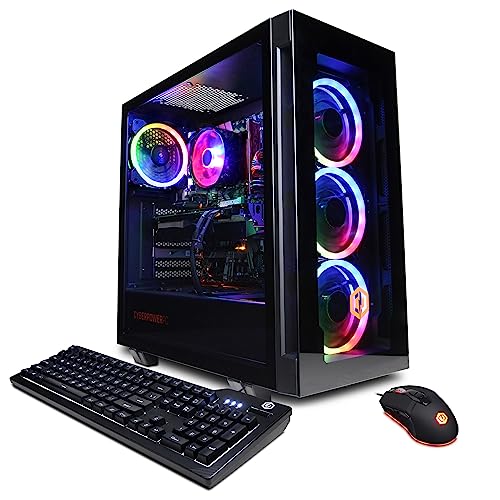
CyberPowerPC Gamer Xtreme VR GXiVR8040A14
- Intel Core i7-13700F processor for gaming and multitasking
- RTX 4060 Ti with 16GB of graphics memory
- 16GB of DDR5 memory and a 1TB NVMe SSD
- Wi-Fi ready with Windows 11 Home pre-installed
The CyberPowerPC Gamer Xtreme VR GXiVR8040A14 is the most balanced system in this guide, pairing a strong processor with a generous graphics card. Its Intel Core i7-13700F runs at 2.1GHz base frequency, and it is joined by a GeForce RTX 4060 Ti with 16GB of graphics memory, 16GB of DDR5 memory, and a 1TB NVMe SSD. That 16GB of graphics memory is the standout detail: it gives the system more headroom for detailed textures and higher resolutions than the 8GB cards in the other gaming picks, and it should age more gracefully as games ask for more video memory.
In everyday use, the combination covers gaming, streaming, video editing, and heavy multitasking. The 1TB drive is large enough for Windows plus a reasonable library of installed games, and Wi-Fi is ready out of the box, with Windows 11 Home pre-installed.
The Gamer Xtreme VR line is aimed squarely at gaming, with a tempered glass side panel and RGB lighting, so buyers who prefer a plain office appearance may find it louder visually than the Acer. The listing does not promise a bundled keyboard and mouse in the same way as the Acer, so check the package contents before ordering. The extra graphics memory delivers its best value on a higher-resolution or high-refresh display rather than a basic 1080p screen.
Pros:
Cons:
Skytech Nebula ST-NEBULA-1343-B-AM
- AMD Ryzen 5 5500 with RTX 4060 8GB for 1080p gaming
- 16GB of DDR4 memory and a 1TB NVMe SSD
- 650W Gold power supply for efficiency and upgrade room
- Wi-Fi and Windows 11 Home included, assembled in the USA
The Skytech Nebula ST-NEBULA-1343-B-AM, model ST-NEBULA-1343-B-AM, is the budget-friendly gaming pick, and it shows how far a sensibly balanced mid-range specification can go. It pairs an AMD Ryzen 5 5500 processor, running at 3.6GHz with a turbo boost of up to 4.2GHz, with an NVIDIA GeForce RTX 4060 graphics card with 8GB of GDDR6X memory. Memory is 16GB of DDR4 3200 with a heat spreader, storage is a 1TB NVMe SSD, and the power supply is a 650W Gold-rated unit. Wi-Fi is included, and Windows 11 Home is pre-installed.
That combination is aimed at 1080p gaming, where the RTX 4060 is comfortable in popular competitive and story-driven titles, and it also handles everyday work, streaming, and light creative tasks. The 1TB drive avoids the storage squeeze that affects smaller drives, and the 650W Gold power supply is a genuine strength at this level: it runs efficiently and leaves room for later component changes.
Skytech describes the Nebula as assembled in the USA, with a one-year warranty on parts and labour and free technical support, plus ARGB fans and a black gaming case with a front mesh design. The listing notes that the exact graphics card brand may vary, so the cooler design is not guaranteed. The platform is also a generation behind the DDR5 systems in this guide: the AM4 socket and DDR4 memory make processor and memory upgrades less forward-looking, even though graphics and storage upgrades remain straightforward.
Pros:
Cons:
CyberPowerPC Gamer Master GMA2700A
- AMD Ryzen 5 7600 on the current AM5 platform
- RTX 4060 8GB graphics for 1080p gaming and streaming
- 16GB of DDR5 memory
- Wi-Fi ready with Windows 11 Home pre-installed
The CyberPowerPC Gamer Master GMA2700A is the current-platform AMD pick, built on the AM5 architecture that gives it a longer upgrade path than the DDR4 system above. Its AMD Ryzen 5 7600 processor has six cores and runs at 3.8GHz, and it is paired with a GeForce RTX 4060 graphics card with 8GB of memory, 16GB of DDR5 memory, and a 500GB NVMe SSD. Wi-Fi is ready, and Windows 11 Home is pre-installed. The Gamer Master series is described by CyberPowerPC as a line of gaming PCs powered by AMD Ryzen processors on the AM5 platform, which is the key distinction from older AMD towers.
In use, the Ryzen 5 7600 and RTX 4060 make a capable 1080p gaming combination, with DDR5 memory and NVMe storage keeping loading times and multitasking smooth. The processor is also a good fit for streaming, because the RTX 4060 includes modern encoding support for recording and broadcasting gameplay.
The clear limitation is storage. A 500GB NVMe drive is the smallest in this guide, and it fills quickly once Windows, several large games, and applications share the same drive. Buyers should plan either to install only a few games at a time or to add storage early. The graphics memory is also 8GB, which is fine for 1080p gaming but less future-proof than the 16GB card in the Gamer Xtreme VR above. Even so, the AM5 socket, DDR5 memory, and modern Ryzen processor give the tower a longer useful life and a clearer upgrade route than a discounted older-platform system.
Pros:
Cons:
Comparison: Which One Fits You
The four desktops in this guide cover different priorities rather than a single ranking. The Acer Aspire TC-1785-UA92 fits buyers who mainly need a reliable computer for home and office work, with a current processor, fast DDR5 memory, and a slim case, and who do not need a dedicated graphics card. Its 8GB of starting memory is the compromise, so plan an upgrade if your workload is heavy.
For gaming, the choice comes down to graphics memory, storage, and platform. The CyberPowerPC Gamer Xtreme VR GXiVR8040A14 is the all-round gaming pick, with the strongest processor and graphics combination here, 16GB of graphics memory, and a 1TB drive. The Skytech Nebula is the value gaming pick, offering the same 1TB of storage and a solid 650W Gold power supply, with the trade-off of an older DDR4 platform. The CyberPowerPC Gamer Master GMA2700A uses the current AM5 platform and DDR5 memory, but its 500GB drive needs attention sooner than the others.
Frequently Asked Questions
What is the best pre built desktop for a first-time buyer?
A first-time buyer should choose a system with a current processor, at least 16GB of memory for gaming or 8GB for light office use, a 512GB or larger NVMe SSD, and Windows 11 Home pre-installed. The Acer Aspire TC-1785-UA92 suits first-time office buyers, while the Skytech Nebula suits first-time gamers.
Do pre-built desktops come with Windows installed?
The four desktops in this guide ship with Windows 11 Home pre-installed, so no separate operating system purchase is needed. Always confirm the operating system in the listing before ordering, because some barebones systems and refurbished towers are sold without it.
How much memory and storage do I need in a pre-built desktop?
Sixteen gigabytes of memory is the safer choice for gaming, streaming, and creative work, while 8GB is workable for light office use and can be upgraded later on the Acer. For storage, 1TB is comfortable for a games library, while 512GB suits office use and 500GB needs regular management or an early storage addition.
Is a gaming pre-built desktop also good for work and school?
Yes, in most cases. A gaming desktop has a strong processor, ample memory, and fast storage, which also suit office work, study, video calls, and creative applications. The main differences are the larger case, gaming styling, and higher power use, so a compact office tower such as the Acer may suit a shared room better.
What should I check before ordering a pre-built desktop?
Check the exact processor and graphics card model, the memory and storage amounts, the power supply, the ports on the front and rear, the included keyboard and mouse, the warranty terms, and the case dimensions against your desk space. Confirming those details in the listing avoids surprises when the tower arrives.
Conclusion
The best pre built desktop is the one whose processor, graphics, memory, and storage match the work you actually do, with enough upgrade room for the years ahead. For home and office use, the Acer Aspire TC-1785-UA92 offers a current processor and a tidy footprint. For balanced gaming, the CyberPowerPC Gamer Xtreme VR GXiVR8040A14 leads with its 16GB graphics card and 1TB drive. For value gaming, the Skytech Nebula pairs a capable RTX 4060 with a solid power supply and a full terabyte of storage. For a current AMD platform, the CyberPowerPC Gamer Master GMA2700A is the forward-looking choice, provided you plan for its smaller drive.
Measure your desk, confirm the ports and package contents, and choose the balance that fits your screen and your workload.
Disclosure: As an Amazon Associate, we earn from qualifying purchases.