Our Short List of 3

- Best for: Students who want the lightest bag and the longest battery life, and who are happy working in the Apple ecosystem with apps like Pages, Keynote, and Safari alongside Microsoft 365 and Google Docs. Watch out for: The 256GB of storage is the smallest in this guide, so students with large media libraries will need cloud storage or an external drive. It has only two Thunderbolt 4 ports, so a hub helps when connecting a monitor, a mouse, and a charger at a desk. Some specialized Windows-only course software may not run on macOS, so check course requirements first.
- Specs: 13.6-inch Liquid Retina display, 2560 x 1664; Apple M4 chip with 10-core CPU and 10-core GPU; 16GB unified memory; 256GB SSD; 12MP Center Stage camera; Touch ID; two Thunderbolt 4 ports; 3.5 mm headphone jack; 53.8 Wh battery; up to 18 hours of video playback; 2.7 pounds; macOS.
- Best for: Students who want the lightest bag and the longest battery life, and who are happy working in the Apple ecosystem with apps like Pages, Keynote, and Safari alongside Microsoft 365 and Google Docs.
- Watch out for: The 256GB of storage is the smallest in this guide, so students with large media libraries will need cloud storage or an external drive. It has only two Thunderbolt 4 ports, so a hub helps when connecting a monitor, a mouse, and a charger at a desk. Some specialized Windows-only course software may not run on macOS, so check course requirements first.

- Best for: Students who write long essays and work with spreadsheets, and who want the largest screen in this guide without moving to a heavier machine. The touchscreen and full-size keyboard suit note-taking and research sessions. Watch out for: At 3.9 pounds it is the heaviest laptop here, so it suits students who do not walk far between classes. The 720p webcam is the weakest camera in this group, so video calls look softer than on the Dell or the MacBook Air. The 50 Wh battery is modest for a 15.6-inch machine, so the charger should stay in the bag on long days.
- Specs: 15.6-inch Full HD IPS touchscreen, 1920 x 1080; Intel Core i5-13420H processor; Intel UHD Graphics; 16GB LPDDR5 memory; 512GB Gen 4 SSD; Wi-Fi 6; backlit keyboard; 720p webcam; 50 Wh battery; 3.9 pounds; 0.71 inches thick; Windows 11 Home; protective sleeve included.
- Best for: Students who write long essays and work with spreadsheets, and who want the largest screen in this guide without moving to a heavier machine. The touchscreen and full-size keyboard suit note-taking and research sessions.
- Watch out for: At 3.9 pounds it is the heaviest laptop here, so it suits students who do not walk far between classes. The 720p webcam is the weakest camera in this group, so video calls look softer than on the Dell or the MacBook Air. The 50 Wh battery is modest for a 15.6-inch machine, so the charger should stay in the bag on long days.
- Best for: Students who want a portable 14-inch laptop with a strong webcam and a taller screen for reading and writing. The anti-glare display helps in bright lecture halls. Watch out for: The display tops out at 250 nits, so it can look dim near a sunny window. The battery life claim of up to 8 hours is the shortest in this group, so heavy days may need a midday charge. It ships with Windows 11 Pro, which adds business features most students will never touch.
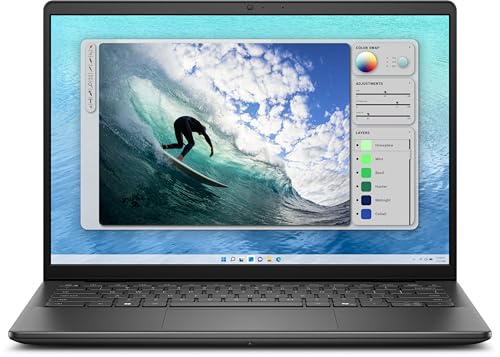
- Specs: 14-inch WUXGA IPS display, 1920 x 1200, anti-glare; Intel Core i5-1334U processor, 10 cores, up to 4.6 GHz; Intel Iris Xe Graphics; 16GB DDR5 memory; 512GB NVMe SSD; Wi-Fi 6; Bluetooth 5.2; backlit keyboard; 1080p Full HD camera; 54 Wh battery, up to 8 hours of battery life; USB-C with Power Delivery and DisplayPort; HDMI; 3.78 pounds; Windows 11 Pro.
- Best for: Students who want a portable 14-inch laptop with a strong webcam and a taller screen for reading and writing. The anti-glare display helps in bright lecture halls.
- Watch out for: The display tops out at 250 nits, so it can look dim near a sunny window. The battery life claim of up to 8 hours is the shortest in this group, so heavy days may need a midday charge. It ships with Windows 11 Pro, which adds business features most students will never touch.
All 4 Picks at a Glance
| Product | Specs | Action |
|---|---|---|
| Apple MacBook Air 13 with M4 |
| Check price on Amazon |
| Acer Aspire 5 15 |
| Check price on Amazon |
| Dell Inspiron 14 i5440 |
| Check price on Amazon |
 Acer Swift Go 14 |
| Check price on Amazon |
Key takeaways
- Find the best laptops for university students with long battery life, light carry weight, and solid everyday speed. Compare five campus-ready picks here.
A laptop is the one tool a university student uses every single day. It carries lecture notes, essays, research tabs, group projects, and video calls with classmates. The wrong one runs out of charge halfway through a lecture, weighs down a backpack, or slows to a crawl with a dozen browser tabs open. The right one disappears into the background and lets the work happen.
The five laptops below are general-purpose student machines. Each one handles documents, browsing, light media work, and video calls with room to spare. None of them is a gaming laptop, and none of them runs a locked-down school OS. They differ in size, weight, battery life, and feel, so the best choice depends on how a student actually spends the day: walking between buildings, working in a library, or typing long essays at a desk.
Disclosure: As an Amazon Associate, we earn from qualifying purchases.
Quick Picks
- Best all-rounder: Apple MacBook Air 13 with M4 — the lightest carry here with the longest battery life.
- Best big-screen value: Acer Aspire 5 15 — a 15.6-inch touchscreen with 16GB of memory and a full keyboard.
- Best 14-inch everyday carry: Dell Inspiron 14 i5440 — a compact 14-inch frame with a sharp webcam for calls.
- Best battery for long days: Lenovo IdeaPad Slim 3i — up to 10 hours of battery life with a fingerprint reader.
- Best screen and speed mix: Acer Swift Go 14 — a bright touch display with a fast Core Ultra 7 chip.
| Laptop | Screen | Processor | Memory / Storage | Weight | Battery |
|---|---|---|---|---|---|
| Apple MacBook Air 13 M4 | 13.6-inch Liquid Retina, 2560 x 1664 | Apple M4, 10-core CPU | 16GB / 256GB SSD | 2.7 pounds | Up to 18 hours video |
| Acer Aspire 5 15 | 15.6-inch Full HD IPS touch, 1920 x 1080 | Intel Core i5-13420H | 16GB / 512GB SSD | 3.9 pounds | 50 Wh |
| Dell Inspiron 14 i5440 | 14-inch WUXGA IPS, 1920 x 1200 | Intel Core i5-1334U | 16GB / 512GB SSD | 3.78 pounds | Up to 8 hours |
| Lenovo IdeaPad Slim 3i | 15.6-inch Full HD, 1920 x 1080 | Intel Core i5-1335U | 16GB / 512GB SSD | 3.52 pounds | Up to 10 hours |
| Acer Swift Go 14 | 14-inch touch, 1920 x 1200 | Intel Core Ultra 7 155H | 16GB / 512GB SSD | Light 14-inch frame | Not stated on listing |
How to Choose
Weight vs screen size. A 13-inch or 14-inch laptop is easier to carry across campus all day, and it fits on small lecture-hall desks. A 15.6-inch laptop gives more room for split-screen work, with two documents side by side, but it adds weight and takes up more bag space. Students who walk between buildings all day should lean toward the lighter 13-inch and 14-inch options. Students who mostly work at one desk can take the bigger screen without penalty.
Battery life. A full day of classes can run eight hours or more, and wall outlets are not always free in a lecture hall or library. Look for a machine that lasts a full teaching day on one charge. The MacBook Air leads this group by a wide margin, and the Lenovo IdeaPad Slim 3i is the strongest Windows pick for battery life. Treat any battery claim as a best case: screen brightness, video calls, and heavy multitasking all pull the number down.
RAM and storage minimums for coursework. 16GB of memory is the right floor for university work in 2026. It keeps a browser full of research tabs, a word processor, a slide deck, and a video call running at the same time without stuttering. 8GB can work for very light use, but it leaves no headroom, and many thin laptops cannot be upgraded later. For storage, 256GB is the minimum, and 512GB is the safer pick: lecture recordings, course files, photos, and apps add up fast across four years. Every laptop in this guide ships with 16GB of memory, and four of the five ship with 512GB of storage.
Keyboard comfort. A student types thousands of words a week, so the keyboard matters more than it looks on a spec sheet. Look for a backlit keyboard for late-night library sessions, well-spaced keys, and a trackpad that does not demand constant adjustment. A fingerprint reader is a useful bonus: it signs a student in fast between classes without typing a password in front of a room full of people.
Durability. A student laptop gets carried in a backpack, set down on hard desks, and used in crowded rooms. An aluminum chassis holds up better than thin plastic over four years, and a spill-resistant keyboard is worth having when a coffee sits next to the machine. A 720p webcam is the bare minimum for video calls; a 1080p camera looks noticeably better in group meetings and online seminars.
Ports and connectivity. Wi-Fi 6 or better keeps up with crowded campus networks. At least one USB-C port, one or two USB-A ports, and an HDMI port cover the common cases: a mouse, a flash drive, and a presentation on a classroom projector. A headphone jack still matters for library work.
Best Laptops for University Students
Apple MacBook Air 13 with M4
- Best for: Students who want the lightest bag and the longest battery life, and who are happy working in the Apple ecosystem with apps like Pages, Keynote, and Safari alongside Microsoft 365 and Google Docs. Watch out for: The 256GB of storage is the smallest in this guide, so students with large media libraries will need cloud storage or an external drive. It has only two Thunderbolt 4 ports, so a hub helps when connecting a monitor, a mouse, and a charger at a desk. Some specialized Windows-only course software may not run on macOS, so check course requirements first.
- Specs: 13.6-inch Liquid Retina display, 2560 x 1664; Apple M4 chip with 10-core CPU and 10-core GPU; 16GB unified memory; 256GB SSD; 12MP Center Stage camera; Touch ID; two Thunderbolt 4 ports; 3.5 mm headphone jack; 53.8 Wh battery; up to 18 hours of video playback; 2.7 pounds; macOS.
- Best for: Students who want the lightest bag and the longest battery life, and who are happy working in the Apple ecosystem with apps like Pages, Keynote, and Safari alongside Microsoft 365 and Google Docs.
- Watch out for: The 256GB of storage is the smallest in this guide, so students with large media libraries will need cloud storage or an external drive. It has only two Thunderbolt 4 ports, so a hub helps when connecting a monitor, a mouse, and a charger at a desk. Some specialized Windows-only course software may not run on macOS, so check course requirements first.
Students who want the lightest bag and the longest battery life, and who are happy working in the Apple ecosystem with apps like Pages, Keynote, and Safari alongside Microsoft 365 and Google Docs. Watch out for: The 256GB of storage is the smallest in this guide, so students with large media libraries will need cloud storage or an external drive. It has only two Thunderbolt 4 ports, so a hub helps when connecting a monitor, a mouse, and a charger at a desk. Some specialized Windows-only course software may not run on macOS, so check course requirements first.
The 256GB of storage is the smallest in this guide, so students with large media libraries will need cloud storage or an external drive. It has only two Thunderbolt 4 ports, so a hub helps when connecting a monitor, a mouse, and a charger at a desk. Some specialized Windows-only course software may not run on macOS, so check course requirements first.
The MacBook Air 13 with the M4 chip is the easiest laptop in this guide to carry and the hardest to run flat. It weighs 2.7 pounds, slips into any bag, and runs silently with no fan. The 13.6-inch Liquid Retina display is sharp and bright enough for outdoor reading between classes, and the 12MP Center Stage camera keeps a student framed well on video calls even when they shift in their seat.
Watch out for: The 256GB of storage is the smallest in this guide, so students with large media libraries will need cloud storage or an external drive. It has only two Thunderbolt 4 ports, so a hub helps when connecting a monitor, a mouse, and a charger at a desk. Some specialized Windows-only course software may not run on macOS, so check course requirements first.
Acer Aspire 5 15
- Best for: Students who write long essays and work with spreadsheets, and who want the largest screen in this guide without moving to a heavier machine. The touchscreen and full-size keyboard suit note-taking and research sessions. Watch out for: At 3.9 pounds it is the heaviest laptop here, so it suits students who do not walk far between classes. The 720p webcam is the weakest camera in this group, so video calls look softer than on the Dell or the MacBook Air. The 50 Wh battery is modest for a 15.6-inch machine, so the charger should stay in the bag on long days.
- Specs: 15.6-inch Full HD IPS touchscreen, 1920 x 1080; Intel Core i5-13420H processor; Intel UHD Graphics; 16GB LPDDR5 memory; 512GB Gen 4 SSD; Wi-Fi 6; backlit keyboard; 720p webcam; 50 Wh battery; 3.9 pounds; 0.71 inches thick; Windows 11 Home; protective sleeve included.
- Best for: Students who write long essays and work with spreadsheets, and who want the largest screen in this guide without moving to a heavier machine. The touchscreen and full-size keyboard suit note-taking and research sessions.
- Watch out for: At 3.9 pounds it is the heaviest laptop here, so it suits students who do not walk far between classes. The 720p webcam is the weakest camera in this group, so video calls look softer than on the Dell or the MacBook Air. The 50 Wh battery is modest for a 15.6-inch machine, so the charger should stay in the bag on long days.
Students who write long essays and work with spreadsheets, and who want the largest screen in this guide without moving to a heavier machine. The touchscreen and full-size keyboard suit note-taking and research sessions. Watch out for: At 3.9 pounds it is the heaviest laptop here, so it suits students who do not walk far between classes. The 720p webcam is the weakest camera in this group, so video calls look softer than on the Dell or the MacBook Air. The 50 Wh battery is modest for a 15.6-inch machine, so the charger should stay in the bag on long days.
At 3.9 pounds it is the heaviest laptop here, so it suits students who do not walk far between classes. The 720p webcam is the weakest camera in this group, so video calls look softer than on the Dell or the MacBook Air. The 50 Wh battery is modest for a 15.6-inch machine, so the charger should stay in the bag on long days.
The Aspire 5 15 is the big-screen pick for students who want room to work. Its 15.6-inch Full HD IPS touchscreen shows a full document page with space to spare, and the touch layer is handy for scrolling through long readings and tapping through slides. The 13th Gen Intel Core i5-13420H and 16GB of LPDDR5 memory handle heavy multitasking, and the 512GB Gen 4 SSD gives plenty of room for four years of files.
Watch out for: At 3.9 pounds it is the heaviest laptop here, so it suits students who do not walk far between classes. The 720p webcam is the weakest camera in this group, so video calls look softer than on the Dell or the MacBook Air. The 50 Wh battery is modest for a 15.6-inch machine, so the charger should stay in the bag on long days.
Dell Inspiron 14 i5440
- Best for: Students who want a portable 14-inch laptop with a strong webcam and a taller screen for reading and writing. The anti-glare display helps in bright lecture halls. Watch out for: The display tops out at 250 nits, so it can look dim near a sunny window. The battery life claim of up to 8 hours is the shortest in this group, so heavy days may need a midday charge. It ships with Windows 11 Pro, which adds business features most students will never touch.
- Specs: 14-inch WUXGA IPS display, 1920 x 1200, anti-glare; Intel Core i5-1334U processor, 10 cores, up to 4.6 GHz; Intel Iris Xe Graphics; 16GB DDR5 memory; 512GB NVMe SSD; Wi-Fi 6; Bluetooth 5.2; backlit keyboard; 1080p Full HD camera; 54 Wh battery, up to 8 hours of battery life; USB-C with Power Delivery and DisplayPort; HDMI; 3.78 pounds; Windows 11 Pro.
- Best for: Students who want a portable 14-inch laptop with a strong webcam and a taller screen for reading and writing. The anti-glare display helps in bright lecture halls.
- Watch out for: The display tops out at 250 nits, so it can look dim near a sunny window. The battery life claim of up to 8 hours is the shortest in this group, so heavy days may need a midday charge. It ships with Windows 11 Pro, which adds business features most students will never touch.
Students who want a portable 14-inch laptop with a strong webcam and a taller screen for reading and writing. The anti-glare display helps in bright lecture halls. Watch out for: The display tops out at 250 nits, so it can look dim near a sunny window. The battery life claim of up to 8 hours is the shortest in this group, so heavy days may need a midday charge. It ships with Windows 11 Pro, which adds business features most students will never touch.
The display tops out at 250 nits, so it can look dim near a sunny window. The battery life claim of up to 8 hours is the shortest in this group, so heavy days may need a midday charge. It ships with Windows 11 Pro, which adds business features most students will never touch.
The Inspiron 14 i5440 is the balanced 14-inch choice: small enough to carry anywhere, large enough to work on all day. Its 14-inch WUXGA display uses a taller 1920 x 1200 layout, which shows more lines of a document or a web page than a standard 16:9 screen. The 1080p Full HD camera is the sharpest webcam among the Windows picks here, which matters for seminars and group calls.
Watch out for: The display tops out at 250 nits, so it can look dim near a sunny window. The battery life claim of up to 8 hours is the shortest in this group, so heavy days may need a midday charge. It ships with Windows 11 Pro, which adds business features most students will never touch.
Lenovo IdeaPad Slim 3i
The IdeaPad Slim 3i is the long-day Windows pick. Its battery lasts up to 10 hours on a charge, the longest claim among the Windows laptops here, and the fingerprint reader signs a student in with one touch. The spill-resistant keyboard is a thoughtful touch for a machine that will live next to coffee cups for four years, and the 15.6-inch Full HD display gives plenty of room for split-screen study sessions.
- Specs: 15.6-inch Full HD display, 1920 x 1080, anti-glare; Intel Core i5-1335U processor; 16GB memory; 512GB SSD; fingerprint reader; spill-resistant keyboard; Wi-Fi 6; USB-C 3.2 Gen 1; USB 3.2 Gen 1; HDMI; 720p HD camera with privacy shutter; up to 10 hours of battery life; 3.52 pounds; Windows 11 Home.
- Best for: Students with long days of back-to-back classes who need a Windows laptop that lasts from the first lecture to the evening library session without hunting for an outlet.
-
Watch out for: The 720p camera is basic, and the display is a standard Full HD panel without touch. At 3.52 pounds it is lighter than most 15.6-inch laptops, but it is still a full-size machine to carry. The keyboard is not backlit on this configuration, which makes late-night typing in a dark room harder.
- View on Amazon
Acer Swift Go 14
- Best for: Students who want the fastest Windows laptop here in a portable 14-inch body, with a touch display for annotating readings and a modern port set for docks and monitors. Watch out for: The listing does not state a battery life figure, so plan on carrying the charger until real-world use is known. The 16GB of memory is soldered, so it cannot be upgraded later. Some older course software may need a check for compatibility with the newer Core Ultra platform.
- Specs: 14-inch touch display, 1920 x 1200; Intel Core Ultra 7 155H processor, 16 cores; Intel Arc Graphics; 16GB LPDDR5X memory; 512GB SSD; Wi-Fi 7; Thunderbolt 4; backlit keyboard; QHD webcam; fingerprint reader; Windows 11 Home.
- Best for: Students who want the fastest Windows laptop here in a portable 14-inch body, with a touch display for annotating readings and a modern port set for docks and monitors.
- Watch out for: The listing does not state a battery life figure, so plan on carrying the charger until real-world use is known. The 16GB of memory is soldered, so it cannot be upgraded later. Some older course software may need a check for compatibility with the newer Core Ultra platform.
Students who want the fastest Windows laptop here in a portable 14-inch body, with a touch display for annotating readings and a modern port set for docks and monitors. Watch out for: The listing does not state a battery life figure, so plan on carrying the charger until real-world use is known. The 16GB of memory is soldered, so it cannot be upgraded later. Some older course software may need a check for compatibility with the newer Core Ultra platform.
The listing does not state a battery life figure, so plan on carrying the charger until real-world use is known. The 16GB of memory is soldered, so it cannot be upgraded later. Some older course software may need a check for compatibility with the newer Core Ultra platform.
The Swift Go 14 pairs a fast Intel Core Ultra 7 155H chip with a bright 14-inch touch display, making it the quickest-feeling Windows laptop in this guide. The 1920 x 1200 touch panel gives the same taller layout as the Dell, and Wi-Fi 7 support keeps it ready for newer campus networks. Intel Arc graphics handle light photo and video work, and the thin 14-inch frame is easy to carry between classes.
Watch out for: The listing does not state a battery life figure, so plan on carrying the charger until real-world use is known. The 16GB of memory is soldered, so it cannot be upgraded later. Some older course software may need a check for compatibility with the newer Core Ultra platform.
Which One Fits
Students who carry their laptop everywhere and want the longest time away from an outlet should pick the MacBook Air 13. It is the lightest machine here and the only one with an 18-hour video playback claim, and its silent, fanless design suits quiet libraries.
Students who want the biggest screen for the least money should pick the Acer Aspire 5 15. The 15.6-inch touchscreen and full keyboard make long writing sessions comfortable, and the 512GB of storage leaves room to grow.
Students who want a compact Windows laptop with a good camera should pick the Dell Inspiron 14. The taller 1920 x 1200 display and 1080p webcam make it a strong pick for reading, writing, and video seminars.
Students with the longest days should pick the Lenovo IdeaPad Slim 3i. Its battery lasts up to 10 hours, and the fingerprint reader and spill-resistant keyboard are practical touches for daily campus life.
Students who want the fastest Windows machine in a portable frame should pick the Acer Swift Go 14. The Core Ultra 7 chip, touch display, and Wi-Fi 7 support make it the most forward-looking pick in this group.
Common Mistakes
Buying 8GB of memory to save money. A laptop with 8GB can feel fine on day one, then slow down once a browser fills with research tabs and a video call runs alongside a document. With 16GB as the floor, this group avoids the problem entirely, but it is the most common regret among students who buy cheaper machines.
Choosing screen size before thinking about the walk. A 15.6-inch laptop looks great on a desk and feels heavy in a backpack after the third building change of the day. Students should weigh the screen against the distance they walk, not just the size of the desk.
Ignoring the webcam. Online seminars, group calls, and virtual office hours are a normal part of university life now. A dim 720p camera works, but a 1080p camera looks far better, and a privacy shutter is worth having in shared housing.
Forgetting the charger and the ports. A laptop with great battery life still needs its charger on exam weeks and long library nights. Before buying, check that the machine has the ports for a mouse, a flash drive, and a classroom projector, or budget for a small hub.
Picking a machine that cannot run course software. Some courses need Windows-only tools, while others work best on a Mac. A quick check of the course list before buying avoids a costly mismatch in the first term.
Frequently Asked Questions
How much RAM does a university student need in a laptop?
16GB is the right amount for most university work. It handles a browser full of research tabs, a word processor, slides, and a video call at the same time without slowing down. 8GB can work for very light use, but it leaves no headroom, and many thin laptops cannot be upgraded later, so 16GB is the safer buy for four years of study.
Is a 14-inch or 15.6-inch laptop better for university?
A 14-inch laptop is better for students who walk between buildings all day, since it is lighter and fits on small lecture-hall desks. A 15.6-inch laptop is better for students who mostly work at one desk and want more screen room for split-screen reading and writing. Both sizes work well; the choice comes down to how much walking the day involves.
How long should a student laptop battery last?
A full teaching day can run eight hours or more, so a laptop that lasts a full day on one charge is the goal. The MacBook Air in this guide carries a claim of up to 18 hours of video playback, and the Lenovo IdeaPad Slim 3i carries a claim of up to 10 hours. Treat every battery claim as a best case, since bright screens and video calls use power faster than light reading.
Do university students need a touchscreen laptop?
No, a touchscreen is a nice extra rather than a need. It helps with scrolling through long readings, tapping through slides, and annotating documents, and two picks in this guide include one. A good keyboard, a comfortable trackpad, and a bright display matter far more for daily coursework than touch support.