Our Short List of 3
All 3 Picks at a Glance
| Product | Specs | Action |
|---|---|---|
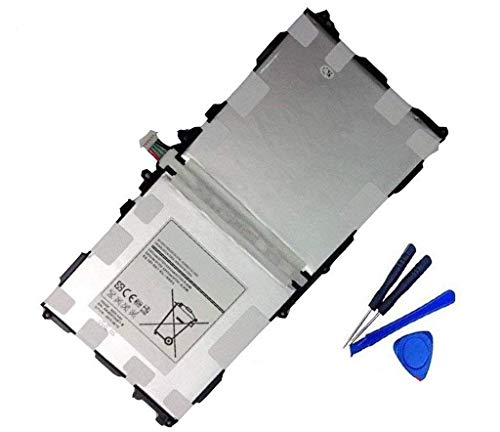 1. Ammibattery Replacement Battery T8220E | Check price on Amazon | |
 2. aowe Tablet Replacement Battery T8220E | Check price on Amazon | |
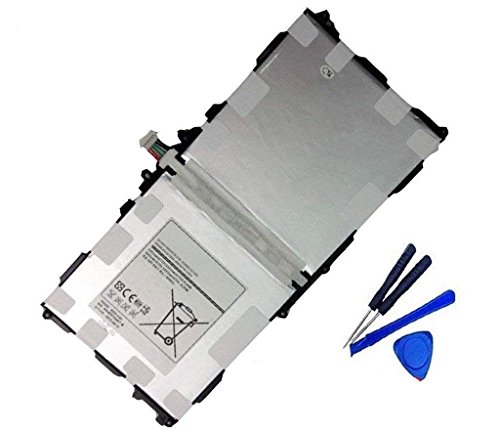 3. Ammibattery Replacement Battery T8220E for Galaxy Note 10.1 | Check price on Amazon |
Key takeaways
- can replace battery in sm 520 tablet? Yes, the Galaxy Tab Pro 10.1 takes a T8220E cell, and this guide shows the steps, tools, and three replacements that fit.
Disclosure: As an Amazon Associate, this site may earn from qualifying purchases made through links on this page.
Intro
Can you replace the battery in an SM 520 tablet? Yes. The SM 520 is the Samsung Galaxy Tab Pro 10.1, sold under the model number SM-T520, and its battery is a removable 8220mAh lithium-ion cell, part number T8220E, rated at 3.8V. The battery is not held by a simple door you open with your fingers. It sits inside the case, glued in place, with its cable plugged into the main board. Replacing it takes a Phillips screwdriver, a plastic opening tool, a suction cup, tweezers, and isopropyl alcohol for the adhesive, plus a steady hand and about an hour of unhurried work.
The replacement is a common repair for this tablet because the original battery is now many years old. A tired battery shows itself in familiar ways: the tablet shuts down while the gauge still shows a charge, it drains while it sits idle, it swells enough to lift the screen, or it only runs while plugged in. Any of those signs means the cell has reached the end of its useful life, and a new T8220E cell restores the tablet to a full day of use. The repair guide for this model states plainly that the battery can be replaced, and that the kit includes an 8220mAh rechargeable battery, tools, video instructions, and a one-year warranty.
This guide walks through the job from start to finish, shows how to match a replacement battery by part number instead of by tablet name, and lists three T8220E replacement batteries sold on Amazon US. All three picks are the same part: 8220mAh, 3.8V, built for the SM-T520 and its close siblings. The differences between them are the brand, the stated compatibility list, and the tool kit in the box, so you can pick the one that matches your tablet and your comfort with the repair.
At a Glance
- Answer: yes, you can replace the battery in an SM 520 tablet. The model is the Samsung Galaxy Tab Pro 10.1, SM-T520.
- Battery part number: T8220E. Match this number first, before the tablet name.
- Capacity and voltage: 8220mAh, 3.8V, lithium-ion. The tablet manual lists the same 8220mAh figure and about 10 hours of video playback on a fresh cell.
- Tools needed: Phillips screwdriver size 00, plastic opening tool, suction cup, tweezers, and isopropyl alcohol for adhesive removal.
- Time: about an hour for a first attempt, unhurried.
- The three picks: Ammibattery T8220E, aowe T8220E, and a second Ammibattery T8220E listing, all 8220mAh and all built for the SM-T520 family.
- Warning: power the tablet off before you open it, keep metal tools away from the battery pouch, and never puncture or bend a swollen cell. Take a swollen battery to a recycling point instead of throwing it away.
How to Choose
Match the part number first. The battery you need is T8220E, and the same cell is also listed as T8220U and T8220K in some listings. A battery sold for the wrong part number may look identical and still fail to fit, because the connector position and the cable length differ between Samsung models. Check the back of your old battery for the printed part number before you order, and buy only a listing that names T8220E in its compatibility list.
Match the capacity and voltage second. The original cell is 8220mAh at 3.8V, and all three picks below match those figures exactly. A replacement with a lower capacity will run the tablet for fewer hours, and a replacement with a different voltage can damage the charging circuit. The tablet manual confirms 8220mAh for the SM-T520, so a listing that claims a higher capacity for the same part number is a claim to treat with care, not a bonus.
Match the tablet model third. The T8220E cell fits the Galaxy Tab Pro 10.1 SM-T520 and SM-T525, and the Galaxy Note 10.1 2014 Edition SM-P600, SM-P601, and SM-P605. Those five models share the same battery bay and connector. The Ammibattery pick below lists all five, the aowe pick lists the same family, and the second Ammibattery pick lists the P601 only, so read the compatibility line of each listing against your own model number, which is printed on the back of the tablet and in the settings menu under About tablet.
Check the tool kit in the box. A good replacement kit includes the Phillips screwdriver, the plastic opening tool, and the suction cup you need to lift the screen without cracking it. The Ammibattery picks below include a repair tool kit, and the aowe pick includes tools as well. If your kit lacks a tool, buy it before you start, because stopping halfway with the screen half lifted is the moment when screens get cracked.
Check the warranty. The repair guide for this model describes a one-year warranty on the kit, and that is the figure to look for in a listing. A replacement battery with no stated warranty is a risk you do not need to take, because a cell that fades in a month should be a cell you can send back.
The Picks
1. Ammibattery Replacement Battery T8220E
The Ammibattery T8220E is the widest-compatibility pick in this guide, and it is the first choice for most SM-T520 owners. Its listing names the part numbers T8220E, T8220U, and T8220K, and it lists compatibility with the SM-P600, SM-P601, and SM-P605, plus the SM-T520 and SM-T525. That covers the whole family that shares this battery bay, so one listing serves the Tab Pro 10.1 and the Note 10.1 2014 Edition alike.
The cell is 8220mAh at 3.8V, matching the original battery exactly, and the kit includes a repair tool kit. The Ammibattery brand appears in three independent battery roundups that link this listing for the SM-T520, and all three agree on the part number and the capacity. That agreement matters for a part like this, because a wrong part number is the most common reason a tablet battery order goes wrong.
This pick suits an owner who wants the broadest compatibility list and a tool kit in the same box. Open the tablet, confirm the old battery says T8220E on its label, and this cell drops into the same bay with the same connector in the same position.
Ammibattery Replacement Battery T8220E
2. aowe Tablet Replacement Battery T8220E
The aowe T8220E is the second pick, and it matches the first pick on the figures that matter: 8220mAh, 3.8V, and compatibility with the SM-T520 family, including the SM-P600, SM-P601, SM-P605, SM-T520, and SM-T525. Its listing describes a high-quality cell with a repair tool kit, and it appears in the same three independent roundups as the Ammibattery, with all three agreeing on the part number and the capacity.
The difference between this pick and the first pick is the brand and the listing age. The aowe listing is an older listing, and its brand is less widely known than Ammibattery. The cell itself carries the same part number and the same capacity, so the choice between the two comes down to which listing you trust more and which one shows stock on the day you order. Both are the same type of product for the same tablet, and both need the same careful opening procedure.
This pick suits an owner who wants a second source for the same part, in case the first pick is out of stock when they order. Keep the part number T8220E in front of you while you compare the two listings, and buy the one whose compatibility line names your exact model.
aowe Tablet Replacement Battery T8220E
3. Ammibattery Replacement Battery T8220E for Galaxy Note 10.1
The third pick is a second Ammibattery T8220E listing, sold for the Galaxy Note 10.1 2014 Edition, model P601. It is the same maker and the same part number as the first pick, and the same 8220mAh capacity at 3.8V. The difference is the listing itself: this one names the P601 only in its compatibility line, while the first pick names the full five-model family.
That narrower listing is worth knowing about, because a buyer who searches for a P601 battery will find this one first, and a buyer with an SM-T520 who orders it on the strength of the part number alone may wonder whether it fits. The cell is the same T8220E cell, so it fits the same bay, but the listing does not promise the SM-T520 by name. If you own a P601, this is the most direct listing for your tablet. If you own an SM-T520, the first pick is the safer order because its listing names your model.
This pick suits a P601 owner who wants the Ammibattery cell with a listing written for their exact model. For SM-T520 owners it stands as a backup source for the same part, with the plain note that its compatibility line is narrower than the first pick.
Ammibattery Replacement Battery T8220E for Galaxy Note 10.1
Comparison Table
| Pick | Part Number | Capacity | Voltage | Fits | Tool Kit | ASIN |
|---|---|---|---|---|---|---|
| Ammibattery T8220E | T8220E / T8220U / T8220K | 8220mAh | 3.8V | SM-P600, SM-P601, SM-P605, SM-T520, SM-T525 | Included | B07MGY4ST1 |
| aowe T8220E | T8220E | 8220mAh | 3.8V | SM-P600, SM-P601, SM-P605, SM-T520, SM-T525 | Included | B01N7M6HJG |
| Ammibattery T8220E for Note 10.1 | T8220E | 8220mAh | 3.8V | SM-P601 | Included | B07FP38PP7 |
Which One Fits Your Situation
If you own the Galaxy Tab Pro 10.1 SM-T520 or SM-T525, the first Ammibattery pick fits. Its listing names your model, it covers the full family, and it includes the tool kit. The aowe pick fits as well, and it is the backup when the first pick is out of stock.
If you own the Galaxy Note 10.1 2014 Edition SM-P600, SM-P601, or SM-P605, all three picks fit, because all three name your family. The third pick is the most direct listing for a P601, while the first two name the wider family. Pick the one whose listing you trust most, and confirm the part number T8220E on the label of the battery you receive before you install it.
If this is your first tablet repair, the tool kit matters as much as the cell. All three picks include tools, so you are not left searching for a Phillips 00 screwdriver with the screen half lifted. Work on a clean table, keep the screws in order, and take a photo of each step so you can retrace the cable routing when you reassemble the tablet.
If your old battery is swollen, stop and handle it with care. Do not puncture it, do not bend it, and do not throw it in household waste. A swollen lithium-ion cell can vent or catch fire if punctured, so set it aside in a non-flammable container and take it to a battery recycling point. The new cell goes in only after the old one is out and the bay is clean.
FAQ
How do I know my tablet is an SM-T520?
Check the back of the tablet for the printed model number, or open the settings menu and look under About tablet. The SM-T520 is the Samsung Galaxy Tab Pro 10.1 with a 10.1-inch screen. The SM-T525 is the same tablet with cellular data. The battery part number T8220E is the same for both.
Is the battery glued in place?
Yes. The battery is held by adhesive, and the screen must be lifted to reach it. Warm the edges gently, work the plastic opening tool around the seam, and use isopropyl alcohol to soften the adhesive under the battery. Never pry the battery itself with a metal tool.
How long does the replacement take?
About an hour for a first attempt, unhurried. Most of that time goes to opening the case and softening the adhesive. The battery swap itself takes a few minutes: unplug the old cable, lift the old cell out, set the new cell in, and plug the new cable into the same socket.
Will a new battery restore the original battery life?
A fresh 8220mAh cell restores the tablet to the battery life it had when new, which the manual lists at about 10 hours of video playback. The tablet itself is old, so a fresh cell does not make it run new software faster, but it does end the sudden shutdowns and the constant need for a charger.
What should I do with the old battery?
Take it to a battery recycling point. Lithium-ion cells do not belong in household waste, and a swollen cell deserves extra care. Many electronics stores and municipal sites take old tablet batteries without charge.
Final Take
Yes, you can replace the battery in an SM 520 tablet. The tablet is the Samsung Galaxy Tab Pro 10.1, model SM-T520, and its battery is the T8220E, an 8220mAh 3.8V cell that three listings on Amazon US still carry. Match the part number first, confirm your model on the compatibility line, and work slowly with the right tools. The Ammibattery T8220E is the widest-compatibility pick for SM-T520 owners, the aowe T8220E is the backup source for the same part, and the second Ammibattery listing is the most direct pick for a P601. Any of the three gives the tablet a fresh cell and a full day of use again.