
Key takeaways
- Place sensors on the likeliest entry points. Front and rear doors and ground-floor windows come first.
- Test the system after setup by arming it and opening each sensor, following the maker’s instructions.
- Battery care. Replace sensor batteries when the app reports low power.
- Router placement. Keep the hub within reliable signal of your Wi-Fi and consider a backup battery or a power strip for the router.
- Do not rely on it for fire or carbon monoxide. A burglar alarm is not a smoke or CO alarm; install certified smoke and CO detectors as required by local code, and follow the manufacturer manuals.
- Renting. Adhesive-mounted sensors are renter-friendly; ask your landlord before drilling.
- False alarms. Some localities fine repeated false alarms from monitored systems, so check local rules.
Under 100 dollars, a starter kit of entry sensors, a motion sensor and a hub is realistic, and a budget-focused kit such as Wyze Home Monitoring is a name-brand example, though listings show it near or just above the cap depending on the seller, while the better-known whole-home systems from SimpliSafe and Ring generally sit above this cap. The honest framing is that the cap buys a basic intrusion-alert system for a small home or apartment, not the full set of sensors, cellular backup and professional monitoring that larger packages bundle. The rest of this guide explains what a kit includes, what ongoing fees to expect, and where cheap kits fall short.
Our top picks


As an Amazon Associate we earn from qualifying purchases at no extra cost to you.
At a glance
| System type | Best for | Key stated specs | Limits |
|---|---|---|---|
| Wyze Home Monitoring starter kit | Apartments and small homes on a tight budget | Wyze lists a hub, keypad, motion sensor and two entry sensors; the hub has a built-in siren (about 88dB per one source) and battery backup and connects by Ethernet or 2.4GHz Wi-Fi; professional monitoring is optional | The specifications list no cellular backup, so an internet outage can block alerts; listings differ on siren loudness and on price |
| SimpliSafe 8-piece kit | Buyers who want a well-known DIY brand and flexible monitoring | SimpliSafe’s page lists a base station, key fob, keypad, two motion sensors and three entry sensors; siren figures differ between sources (95dB to 105dB); built-in cellular and battery backup, with monitoring on a paid plan | Usually listed above 100 dollars; contents differ between sellers |
| Ring Alarm 8-piece kit | Households already using Ring cameras or doorbells | Listings show a base station with a 104dB siren, keypad, four contact sensors, a motion detector and a range extender; cellular backup needs a paid plan | Priced well above this cap, plus optional monthly monitoring |
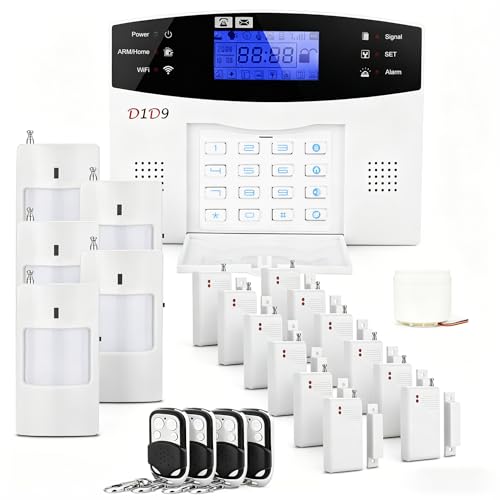
| Generic Wi-Fi door and window alarm kits | Renters wanting a loud local alarm without a subscription | Listings describe multiple door and window sensors, a siren (some list 120dB) and a remote | Wi-Fi 2.4GHz only on many; build quality and app support vary widely |
What an alarm kit actually does
A DIY alarm system has a base station or hub, a few sensors, and a siren or notification path. Entry sensors sit on doors and windows and report when opened. A motion sensor watches a room. When the system is armed and a sensor trips, the siren sounds and the app alerts you. If you pay for monitoring, a call center may also be notified. If you do not, you are the monitor: you receive the alert and decide whether to call local emergency services.
That distinction is why monitoring fees feature in every comparison. Wyze’s optional monitoring has historically been priced below the major rivals, but fees and plan details change, so look at each provider’s own plan page before relying on any figure.
What the cap realistically buys
Wyze Home Monitoring is one of the lower-cost name-brand routes, with a core kit of a hub, keypad, motion sensor and two entry sensors, and Wyze describes its motion sensor as pet-friendly. That covers a front door, one more opening and a main room. Larger homes need extra sensors, which is where the total climbs. SimpliSafe’s 8-piece kit is usually priced above this cap, and Ring’s 8-piece kit is priced above it as well.
Generic Wi-Fi kits cost the least, with some including multiple sensors, a siren and remote for very little. Listings describe these as no-subscription options with loud sirens, but they vary in app quality, update support and reliability, and many connect only to 2.4GHz Wi-Fi. If you pick one, choose a seller with clear documentation and a return policy, and treat the alerts as a convenience rather than a guarantee.
Key features to compare
Cellular and battery backup
A system that relies only on your home internet can go quiet during an outage or if a router is unplugged. Wyze’s specifications list Ethernet and Wi-Fi connections but no cellular backup, which is the main drawback. Systems with cellular backup and a battery in the base station keep working through power or internet loss, and they usually sit above this budget.
Siren loudness and placement
Listings quote decibel levels such as 95dB or 120dB, but figures are measured at a close distance and not comparable across brands. A siren is meant to startle and draw attention; place the base station where it is audible through the home.
Sensor coverage
Count your entry points: front door, back door, ground-floor windows, a patio door. Then count how many sensors the kit includes and how much each extra sensor costs from the same brand, since mixing brands is rarely supported.
Pets
If you have pets, a pet-friendly motion sensor reduces false alarms. Wyze describes its motion sensor as pet-friendly, and other makers specify a weight limit for their pet-immune sensors.
Contracts and fees
Plans and contract terms differ by provider and change over time. Read every plan page for what is included, such as video, cellular backup and the length of any commitment.
Picks by buyer type
Apartment dweller on a minimal budget: Wyze starter kit
It is one of the lowest-cost recognized brands, with optional professional monitoring. The trade-offs are its reliance on home internet, with no cellular backup listed, and a 2.4GHz Wi-Fi setup unless you use Ethernet.
Buyer who wants stronger coverage: SimpliSafe or Ring above the cap
If your home has many openings, the better choice is an 8-piece or larger kit from SimpliSafe or Ring, which sit above this budget. Ring’s Alarm Pro is sold as an alarm base station that also works as a Wi-Fi router, which can make sense if you were going to replace your Wi-Fi anyway.
Renter who wants a loud siren and no subscription
A generic door and window alarm kit may suffice. Understand that it only sounds a local siren, that no alarm can guarantee it will stop a break-in, and that its support and security may be less proven than major brands.
Household already invested in smart home gear
Ring ties in with its own cameras and doorbells, and other brands support other smart home platforms, but those systems are priced above this cap. Check each listing for the platforms it supports.
Decision table: pick this if
| Pick this if | Choose | Why |
|---|---|---|
| You want a name-brand system within budget | Wyze Home Monitoring starter kit | Lower-cost recognized brand with optional monitoring |
| You want a loud local siren, no fees | A generic Wi-Fi door and window kit | No subscription and sirens up to 120dB listed |
| You have a larger home | An 8-piece or larger kit from a major brand | More sensors and backup, at a higher tier |
| You need cellular backup | A higher-tier system that lists it | Internet-only kits can fail in an outage |
| You have pets | A kit with a pet-friendly motion sensor | Fewer false alarms |
Installation and safety notes
- Place sensors on the likeliest entry points. Front and rear doors and ground-floor windows come first.
- Test the system after setup by arming it and opening each sensor, following the maker’s instructions.
- Battery care. Replace sensor batteries when the app reports low power.
- Router placement. Keep the hub within reliable signal of your Wi-Fi and consider a backup battery or a power strip for the router.
- Do not rely on it for fire or carbon monoxide. A burglar alarm is not a smoke or CO alarm; install certified smoke and CO detectors as required by local code, and follow the manufacturer manuals.
- Renting. Adhesive-mounted sensors are renter-friendly; ask your landlord before drilling.
- False alarms. Some localities fine repeated false alarms from monitored systems, so check local rules.
Alternatives
- Standalone door and window alarms. Battery-powered chimes or sirens for a couple of doors with no hub.
- Cameras and video doorbells. Offer visual confirmation but are different from an alarm.
- Higher-tier DIY systems. If you want cellular backup and professional monitoring, the next tier up is worth considering, even though it exceeds this cap.
Tiers compared
| Tier | What to expect | Trade-off |
|---|---|---|
| Budget | Starter kits with a hub and a handful of sensors, generic Wi-Fi kits | Limited coverage; internet-dependent |
| Mid-range | 8-piece kits from SimpliSafe or Ring | More sensors and features; above this cap |
| Premium | Larger kits with cellular backup and cameras | Better resilience; highest total cost |
Frequently Asked Questions
Is a system under 100 dollars worth it?
For a small apartment or a single entry, it can add useful alerts and a siren. It will not match the coverage and backup of larger systems, so match expectations to what the kit includes.
Do I need professional monitoring?
Not necessarily. Many people self-monitor through app alerts and a loud siren, but you need to be reachable. Professional monitoring adds a call center, usually for a monthly fee described on the provider’s plan page.
What happens if my internet goes out?
Systems that rely only on Wi-Fi may be unable to send alerts, as with a Wi-Fi-only design such as the Wyze hub. Systems with cellular backup continue to report. Check each product’s specifications for backup details.
Will pets set it off?
Motion sensors can trigger from animals unless they are designed to ignore them. Read the maker’s pet-immunity weight guidance and consider using door and window sensors only.
Can an alarm kit detect smoke or carbon monoxide?
Only if the maker sells and states compatible detectors. A burglar kit does not replace certified smoke and CO alarms, which you should install according to the manuals and local code.
Are generic kits secure?
Quality and support vary. Choose sellers with clear documentation, keep the firmware and app updated, and use a strong unique password on the account.


