
Key takeaways
- Test every sensor in its final spot and arm the system to confirm the siren and alerts work.
- Keep sensors in range and avoid mounting directly on large metal surfaces, which can weaken the signal.
- Use a strong account password and enable two-factor authentication where the app offers it.
- Not a fire system. A wireless burglar kit does not replace certified smoke and carbon monoxide alarms; install those according to their manuals and local code.
- Know your local rules. Some areas regulate siren duration, monitoring permits and false alarm fines.
- Keep the manual and note the reset and battery replacement steps for each sensor.
If you want a wireless alarm for under 100 dollars, the realistic choices are a small hub-based starter kit from a budget brand such as Wyze (listings show it near or just above the cap), a sale-priced SimpliSafe 8-piece kit, or a generic Wi-Fi door and window kit with a loud siren; the larger Ring and SimpliSafe bundles usually sit above this cap. What makes a system wireless is how its parts talk to each other and to your phone, and that is where cheap kits differ most: radio range, battery life, what happens when Wi-Fi drops, and how well the system resists interference and tampering.
Our top picks


As an Amazon Associate we earn from qualifying purchases at no extra cost to you.
At a glance
| Option | Best for | Key stated specs | Limits |
|---|---|---|---|
| Wyze Home Monitoring starter kit | Small homes wanting low monthly cost | Wyze lists a hub, keypad, motion sensor and two entry sensors; the hub has a built-in siren and battery backup and connects by Ethernet or 2.4GHz Wi-Fi; monitoring is optional | The specifications list no cellular backup; listings differ on price and siren loudness (about 88dB in one source) |
| SimpliSafe 8-piece wireless kit | Buyers wanting a known brand and flexible monitoring | SimpliSafe’s page lists a base station, key fob, keypad, two motion sensors and three entry sensors; siren figures differ between sources; built-in cellular and battery backup, with monitoring on a paid plan | Usually above this cap; contents differ between sellers |
| Ring Alarm 8-piece kit | Ring camera and doorbell households | Listings show a base station with a 104dB siren, keypad, four contact sensors, a motion detector and a range extender; cellular backup needs a paid plan | Priced well above this cap |
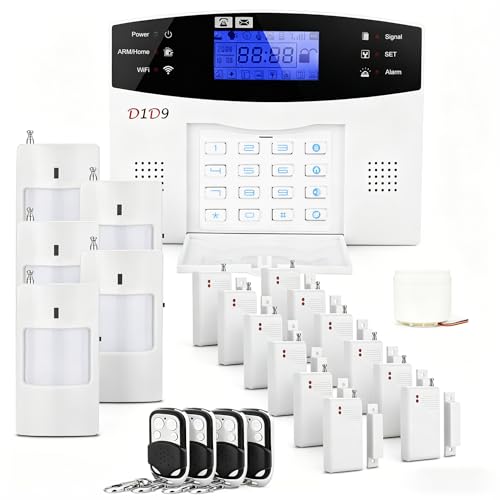
| Generic Wi-Fi alarm kits | Renters wanting a loud local siren without fees | Listings describe door and window sensors, a siren (some list 120dB) and a remote | Often 2.4GHz-only; software support varies |
How wireless systems communicate
A wireless alarm has two links to understand. The first is between sensors and the base station, usually a short-range proprietary radio or a Wi-Fi connection. The second is between the base station and the outside world, through your router or a cellular radio. Cheap systems often use Wi-Fi for both, which keeps hardware simple but ties everything to your router’s health. More expensive systems typically keep sensors on a dedicated radio and add cellular backup so alerts still go out if home internet fails. Wyze’s hub, for example, lists Ethernet and Wi-Fi connections but no cellular backup, so an internet outage can block alerts and monitoring.
When sensors use Wi-Fi directly, as many generic kits do, each sensor competes with your phones and laptops for network capacity, and many such products connect only on the 2.4GHz band. A crowded network or a weak signal in the far corner of a house can mean dropped sensors. If you choose a Wi-Fi-only kit, test every sensor in its final location after installing it.
Range, batteries and placement
Range
Makers list radio range in open air, which is far more generous than in a real house with walls and appliances. Place the base station centrally, away from metal cabinets, and avoid putting it in a basement corner. If a sensor drops out, move the base station before blaming the sensor.
Batteries
Wireless sensors run on batteries, so low-battery alerts and replacement are part of ownership. Keep spare batteries of the type listed in the manual, and replace them when the app prompts, rather than waiting for a failure.
Power outages
A base station with its own backup battery keeps the system armed during a power cut. Without cellular backup, though, the system may still be unable to alert you if your router is down. Plugging the router into a battery backup is a practical stopgap.
Security of the wireless link
Wireless alarms can be affected by interference, and in principle by deliberate jamming. Reputable systems monitor for lost signals and tamper events and report them, but low-cost generic kits may not. Many listings do not detail this, so treat tamper and supervision features as a point to read in each maker’s documentation. Use a strong unique password for the app account, keep the app and hub firmware updated, and avoid reusing passwords across smart-home services.
Picks by buyer type
Renter who wants a no-drilling setup
Adhesive-mounted wireless sensors suit renters, and a starter kit with a hub and entry sensors covers a front door and one more opening. Take the sensors with you when you move, following the maker’s instructions for removing adhesive.
Budget buyer who wants optional monitoring
Wyze Home Monitoring is one of the lower-cost monitored systems, with the trade-off of internet dependence. Decide whether self-monitoring through app alerts is enough for you.
Buyer who wants dependability above all
That points to a higher tier with cellular backup, such as a larger SimpliSafe or Ring kit. These exceed this cap, so for now the practical question is whether to save for them or accept a basic kit.
Loud-siren, no-subscription buyer
A generic Wi-Fi kit with a siren suits a small apartment, though no alarm can guarantee it will stop a break-in. Expect to manage the app and updates yourself, and buy from a seller with a clear return policy.
Decision table: pick this if
| Pick this if | Choose | Why |
|---|---|---|
| You want the lowest ongoing monitoring cost | Wyze Home Monitoring | Lower-cost name brand with optional monitoring |
| You want a known brand with no contract | SimpliSafe 8-piece if available near the cap | Monitoring terms are on SimpliSafe’s plan page; check them |
| You already use Ring cameras | Ring Alarm, above this cap | Ecosystem fit |
| You only need a loud siren at a door | A generic Wi-Fi kit or standalone door alarm | Simple and inexpensive |
| Your internet is unreliable | A system with cellular backup, at a higher tier | Wi-Fi-only kits may fail silently |
Installation and safety notes
- Test every sensor in its final spot and arm the system to confirm the siren and alerts work.
- Keep sensors in range and avoid mounting directly on large metal surfaces, which can weaken the signal.
- Use a strong account password and enable two-factor authentication where the app offers it.
- Not a fire system. A wireless burglar kit does not replace certified smoke and carbon monoxide alarms; install those according to their manuals and local code.
- Know your local rules. Some areas regulate siren duration, monitoring permits and false alarm fines.
- Keep the manual and note the reset and battery replacement steps for each sensor.
Alternatives
- Standalone battery door alarms. No hub, no app, just a chime or siren at a door.
- Smart locks and contact sensors for an existing smart-home hub. If you already run a hub, compatible sensors may cost less than a new kit.
- Cameras with local siren features. A different product, offering visual information instead of door and window triggers.
Tiers compared
| Tier | What to expect | Trade-off |
|---|---|---|
| Budget | Wi-Fi hub starter kits and generic kits | Simple, internet-dependent |
| Mid-range | 8-piece kits with dedicated sensor radios | Better reliability; above this cap |
| Premium | Systems with cellular backup, cameras and professional monitoring | Most resilient; highest total cost |
Questions to ask before buying any wireless kit
Start with the home itself. A one-bedroom apartment with a single door needs far less than a house with a back patio and a garage entry, and the number of openings sets how many sensors you need. Next, ask what happens when the hub loses power or internet, because the answer separates basic kits from resilient ones. Then ask how the system tells you something is wrong: a good system reports a sensor that has gone silent or a battery that is nearly flat, rather than staying quietly armed with a dead sensor. Finally, ask what you will do when an alert arrives. If you are away at work or asleep, a push notification alone may go unseen, which is the practical argument for optional professional monitoring or for a loud siren that neighbors will notice. A system you understand and have tested is worth more than a long feature list you never configured.
Also consider how the kit will age. Apps need updates, sensors need batteries and some makers retire older hardware. Prefer makers with a clear support page, an accessible manual and a stated warranty, and keep the box and receipt in case you need to return a faulty sensor.
Frequently Asked Questions
Is a wireless alarm less reliable than a wired one?
It depends on the design. Well-made wireless systems report lost signals and low batteries, but they depend on batteries and radio conditions. Budget kits that rely only on Wi-Fi are more exposed to router and internet problems.
What happens when the Wi-Fi goes down?
A Wi-Fi-only system may be unable to send alerts, though a local siren may still sound. Wyze’s specifications, for example, list no cellular backup. Systems with cellular backup continue to report.
How long do the sensor batteries last?
It varies by sensor and how often it triggers. Check the maker’s stated battery life for each sensor and keep spares on hand.
Can wireless alarms be jammed?
In principle, radio signals can be disrupted. Better systems watch for lost sensor signals and report tampering. Read the product documentation to see whether such supervision is listed.
Do I need a subscription?
Not to get a siren and app alerts, but professional monitoring, cameras and cellular backup typically require a paid plan. Review each plan page for what is included.
Can I add sensors later?
Usually yes, but only sensors from the same brand and system family. Check the cost and availability of extra sensors before choosing a kit.


